The Ultimate Local PDF Toolkit
Combine, format, secure, and process your documents and images directly on your Windows desktop. No cloud uploads. No subscription fees.
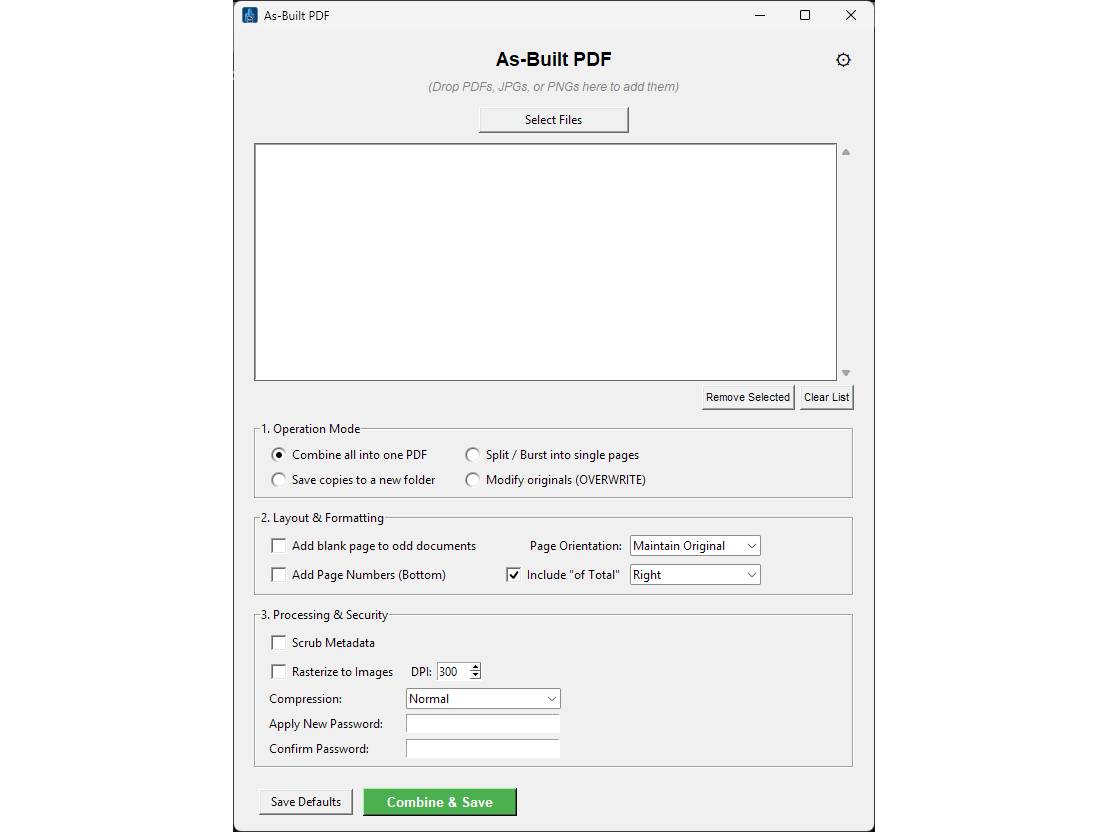
Everything You Need in One Clean Interface
Operation Modes
Instantly combine multiple files into one PDF, burst a large document into single pages, create modified copies, or overwrite your originals to save time.
Processing & Security
Flatten complex files by rasterizing them to high-DPI images, scrub sensitive metadata, apply normal or maximum compression, and lock your files with enterprise-grade AES-256 encryption.
Layout & Formatting
Automatically insert blank pages into odd-numbered documents for perfect double-sided printing. Apply global orientation fixes and stamp dynamic page numbers to the bottom of every sheet.
Native Windows Integration
Features a seamless drag-and-drop interface and a native Windows right-click context menu. Simply highlight your files, right-click, and select "Open with As-Built PDF".
100% Local. 100% Secure.
Unlike web-based PDF tools that require you to upload proprietary drawings, client financials, or sensitive personal data to external servers, As-Built PDF processes everything locally on your own CPU.
With an integrated 15-day trial, you can test the full capabilities of the software—including combining PDFs and JPGs—on batches of up to two files before committing.